 CalendarKit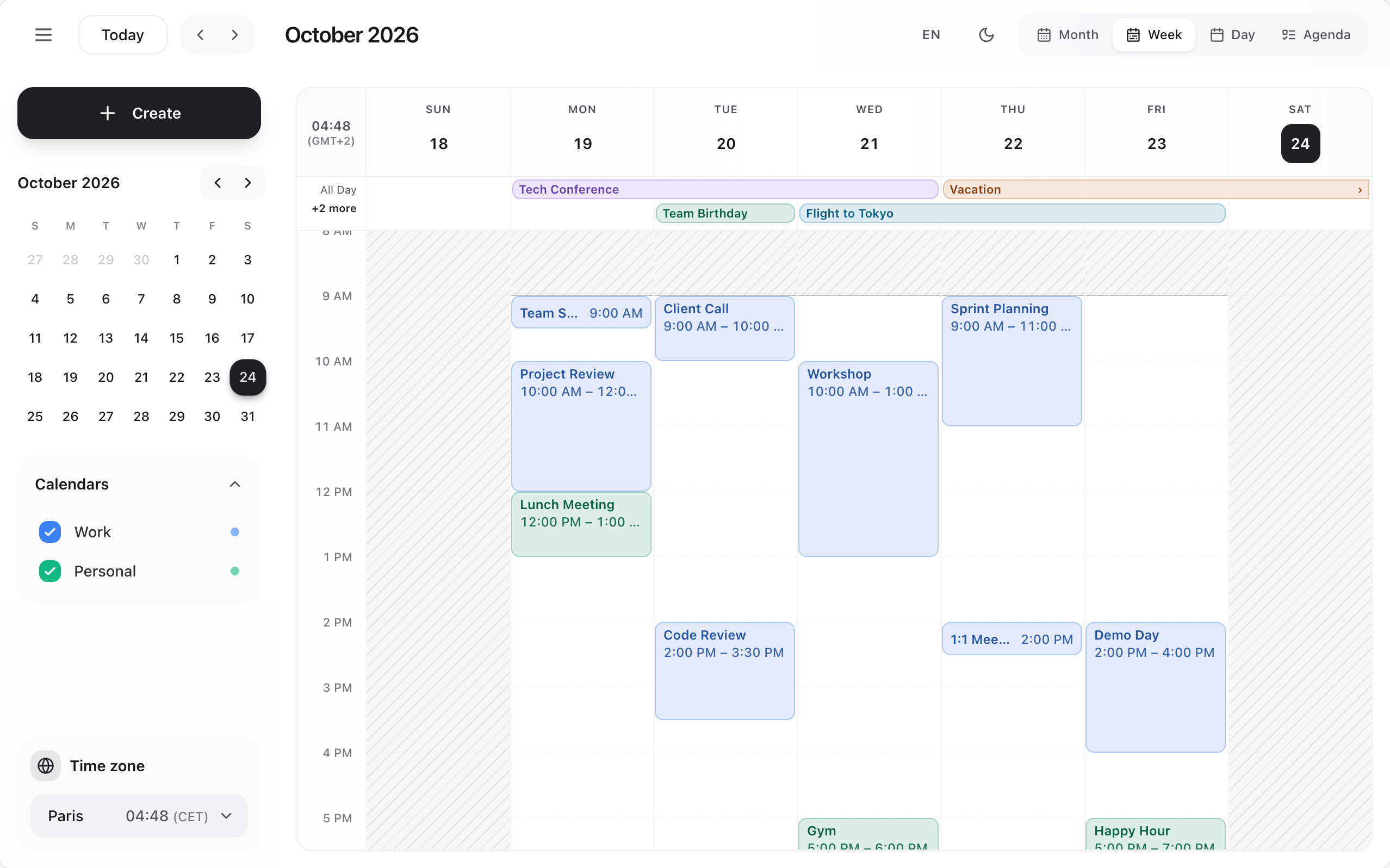
The new CalendarKit: rebuilt on a framework-free engine, redesigned, accessible and ready for phones. Upgrading from 1.x: see MIGRATION.md; every example of the 1.4 README still runs unchanged. The pre-releases below list every change in detail.
- No setup. The calendar ships its own compiled, scoped stylesheet: no Tailwind configuration, nothing to import (
calendarkit-pro/styles.cssremains available as a file). - Redesigned. Three themes (Calm, Vivid, Editorial) in light and dark, every colour a CSS variable, event colours adjusted to WCAG AA contrast.
- Create in place. Click or drag over free time; the quick card understands sentences ("Lunch with Lea tomorrow 1pm for 2h") in English and French. Every change shows Undo; the event card opens beside the event.
- Three layouts. Classic, Focus (the grid under a floating toolbar, editing in a side panel) and Flow (the day as a feed with free slots to book).
- Time grid. Visible hours, slot length, working hours, reversed time axis (issue #2), drag to create.
- Phones. Under 768 px of calendar width: day view, drawer, bottom sheets, 44 px targets, a month of day buttons.
- Accessible. Every event and slot is a named button; dialogs trap and return the focus; no keyboard shortcuts to learn.
- Places. Optional location suggestions (
placeSearch,photonPlaces()for OpenStreetMap). - Integration. Uncontrolled mode (
defaultEvents,onEventsChange),classNames,components, server rendering with React 18 and 19. - Headless.
calendarkit-pro/core(the engine, no React) andcalendarkit-pro/react(hooks and helpers) to build your own calendar UI.
- The root
cnexport, deprecated in 1.4.1.
13 pre-releases led to 2.0.0Show
2.0.0-beta.124 October 2026 · ToolbarProps.compact: a custom components.Toolbar knows when the calendar is in its phone layout.
Pre-release on the next dist-tag (latest stays on 1.4.x). The API is complete: from here to 2.0.0, fixes only.
ToolbarProps.compact: a customcomponents.Toolbarknows when the calendar is in its phone layout.- Drag announcements in the calendar's language (new keys
dragStart,dragEnd,dragCancel), and no English keyboard instructions left for screen readers (dragging is a pointer gesture; the event form is the keyboard way). - Colour swatches named by colour (new keys
colorBlue…colorIndigo).
- After a delete, the focus goes to the hour the event was in (its day for an all-day event) instead of being lost.
- A host's own form (
renderEventForm,components.EventEditor) gives the focus back to what opened it when it closes. - Time zone choices in the side panel are buttons, reachable with the keyboard; the current one is marked.
- React 18 server rendering no longer warns about
useLayoutEffect, and a day or week view of today hydrates without a mismatch (the current-time line appears once mounted). - The phone layout leaves room under the floating Create, so the last events are not hidden behind it.
- Scheduler budget: 59 kB brotli (was 58 kB).
- Every example of the 1.4.1 README runs as a test (the 1.x contract); server rendering is tested without a DOM, hydration without warnings; CI runs the suite with React 18 too, and on both 2026 clock changes (
npm run test:dst).
2.0.0-alpha.1123 October 2026 · Phone layout under 768 px of calendar width (measured on the calendar, not the window): the day view first when view is not controlled; a two-row header with Today always shown and 44 px targets; the side panel as a drawer (light scrim, close button, closes after a pick); the event card, the quick card and the full form as bottom sheets with their actions in view (Focus edits in a sheet, and picks its view from a menu); a month of day buttons with a dot per event; one floating Create.
Pre-release on the next dist-tag (latest stays on 1.4.x).
- Phone layout under 768 px of calendar width (measured on the calendar, not the window): the day view first when
viewis not controlled; a two-row header with Today always shown and 44 px targets; the side panel as a drawer (light scrim, close button, closes after a pick); the event card, the quick card and the full form as bottom sheets with their actions in view (Focus edits in a sheet, and picks its view from a menu); a month of day buttons with a dot per event; one floating Create. - Mini-calendar days are named in full ("Thursday 15 October 2026") and say which one is selected.
- The side panel follows the calendar's width instead of the window's: a calendar of 768 px or more shows it (it was hidden below 1024 px of window), a narrower one has the drawer.
- The floating Create button only appears in the phone layout (it was in the page, hidden by CSS, at every size).
- The Flow day strip keeps the chosen day in view on a phone.
2.0.0-alpha.1023 October 2026 · Keyboard and screen reader support (no shortcuts: Tab, Enter, Space, Escape). Events, all-day bars, month chips, agenda items, resource blocks and Flow cards are native buttons with a full name (title, date, times, calendar, place); time slots and all-day cells are buttons that say what they create, one tab stop per hour; month day numbers open the day. A visible focus ring everywhere.
Pre-release on the next dist-tag (latest stays on 1.4.x).
- Keyboard and screen reader support (no shortcuts: Tab, Enter, Space, Escape). Events, all-day bars, month chips, agenda items, resource blocks and Flow cards are native buttons with a full name (title, date, times, calendar, place); time slots and all-day cells are buttons that say what they create, one tab stop per hour; month day numbers open the day. A visible focus ring everywhere.
- Dialogs keep Tab inside them and give the focus back to what opened them when they close (an editor opened from the event card goes back to the event); the Focus panel gives it back without trapping Tab. The event just created, duplicated or moved takes the focus.
- The drag wrappers around events are no longer tab stops (the event button inside them is): dragging stays a pointer gesture, with the event form as the alternative.
- Scheduler budget: 58 kB brotli (was 56 kB).
- Place search: its list stays in the document while closed (
aria-controlsalways resolves) and one live region announces searching, no result and unavailable. - Event card: the row icons no longer carry names that repeat the content; "1 event" instead of "1 events".
2.0.0-alpha.923 October 2026 · layout="focus": the grid takes the whole calendar, under a floating toolbar (period, Today, previous / next, views, Create); a click on an event edits it in a side panel docked beside the grid (while it has changes, a click on the grid asks first). layout="flow": the week's days as a strip (dots for how busy each day is), the day as a feed of cards in order with free slots to book (an hour at their start) and the current time, a floating Create; the full form opens as a bottom sheet. layout="classic" stays the default. New type CalendarLayout.
Pre-release on the next dist-tag (latest stays on 1.4.x).
layout="focus": the grid takes the whole calendar, under a floating toolbar (period, Today, previous / next, views, Create); a click on an event edits it in a side panel docked beside the grid (while it has changes, a click on the grid asks first).layout="flow": the week's days as a strip (dots for how busy each day is), the day as a feed of cards in order with free slots to book (an hour at their start) and the current time, a floating Create; the full form opens as a bottom sheet.layout="classic"stays the default. New typeCalendarLayout.
- Scheduler budget: 56 kB brotli (was 52 kB).
- Week view: the current-time line and its badge were drawn over the day header when the grid was scrolled past them; the header now stays above everything that scrolls and is opaque.
- Working hours read as a band: the time outside them is hatched, with a line where work starts and ends (it was a faint flat tint, so the working hours looked like a stray white box).
2.0.0-alpha.822 October 2026 · Place search in the form's Location field: placeSearch (off by default) and the photonPlaces() adapter (OpenStreetMap, no key). Suggestions as you type, a chosen place saved as event.place with a map card, "Open in Maps" and "Directions" in the form and the event card; a video link is kept as typed. New types Place and PlaceSearch.
Pre-release on the next dist-tag (latest stays on 1.4.x).
- Place search in the form's Location field:
placeSearch(off by default) and thephotonPlaces()adapter (OpenStreetMap, no key). Suggestions as you type, a chosen place saved asevent.placewith a map card, "Open in Maps" and "Directions" in the form and the event card; a video link is kept as typed. New typesPlaceandPlaceSearch.
- Create opens the quick card at the next free hour today (the week and day views go there first), like a click in the grid; with
renderEventForm, your form opens at that time. - The full form is a card beside the event or the new event (which stays drawn in the grid), no longer a dialog over a dimmed, blurred calendar.
- The quick card is laid out like the quick event of the big calendars: a close button, the title, then one row each for the date and times (edited in place), guests, location (place search included), description and calendar, and More options and Save. Guests, location and description are saved with the event or carried to "More options"; the duration chips and Cancel are gone. The new event is drawn solid in the grid, with its title and times.
- Scheduler budget: 52 kB brotli (was 48 kB).
- The full form showed and saved times in the machine's time zone instead of the calendar's
timezone.
2.0.0-alpha.722 October 2026 · Configurable time grid for the week, day and resource views: dayStartHour and dayEndHour (events are cut at those hours), slotDuration (5 to 60 minutes; clicks, drops, resizes and drag selection snap to it), reverseTimeAxis (the latest hours on top, issue 2), workingHours (time outside it is shaded) and scrollToHour (where the grid opens). New exported type WorkingHours.
Pre-release on the next dist-tag (latest stays on 1.4.x).
- Configurable time grid for the week, day and resource views:
dayStartHouranddayEndHour(events are cut at those hours),slotDuration(5 to 60 minutes; clicks, drops, resizes and drag selection snap to it),reverseTimeAxis(the latest hours on top, issue #2),workingHours(time outside it is shaded) andscrollToHour(where the grid opens). New exported typeWorkingHours. - Drag over free time with a mouse or a pen to create an event over that range: the quick card opens with it.
- Scheduler budget: 48 kB brotli (was 46 kB).
2.0.0-alpha.622 October 2026 · The event card opens beside the event instead of over it (below or above an event too wide to sit beside, next to the pointer when the event cannot be measured), stays inside the window, and lists the date, times and length, location, guests, reminders, calendar, attachments and description on icon-led rows.
Pre-release on the next dist-tag (latest stays on 1.4.x).
- The event card opens beside the event instead of over it (below or above an event too wide to sit beside, next to the pointer when the event cannot be measured), stays inside the window, and lists the date, times and length, location, guests, reminders, calendar, attachments and description on icon-led rows.
- The quick card opens beside the new event drawn in the grid; the words it understood are highlighted.
- The full form is redesigned: one labelled row per part (When, Calendar, Location, Guests, Reminders, Description), reminders as removable chips with "Add reminder", a native calendar menu with its colour, and a footer that stays in view (the calendar's height and the window's). Closing with changes asks in that footer.
- Dialogs are announced as dialogs (
role="dialog", named by their heading). - Reminders are labelled from their minutes in the calendar's language, in the form as in the event card: a
labelstored on a reminder is no longer displayed.
2.0.0-alpha.522 October 2026 · Uncontrolled mode: defaultEvents and onEventsChange. The calendar keeps the list itself; onEventsChange receives the whole list after every change (also in controlled mode). The event just created is outlined in this mode too.
Pre-release on the next dist-tag (latest stays on 1.4.x).
- Uncontrolled mode:
defaultEventsandonEventsChange. The calendar keeps the list itself;onEventsChangereceives the whole list after every change (also in controlled mode). The event just created is outlined in this mode too. classNamesforroot,toolbar,sidebar,event,slot,allDayBaranddialog.components: your ownEventContent,EventEditor(equivalent torenderEventForm),Toolbar,SidebarandEmptyState, with exported prop types.- A click on an event opens a card next to it (date and time, calendar, location, guests, reminders, attachments, description) with Edit, Duplicate and Delete. It stays inside the window and keeps its place while open.
- The form no longer has a read-only view: it opens from the card's Edit (or the event menu's Edit) ready to edit.
2.0.0-alpha.422 October 2026 · Quick create: a click on a free slot opens a compact card with the new event drawn dashed in the grid. The title is understood as a sentence ("Lunch with Lea tomorrow 1pm", in English or French) and the card shows what it understood; duration chips, a calendar menu, an overlap warning, "More options" (the full form, prefilled), Enter to save.
Pre-release on the next dist-tag (latest stays on 1.4.x).
- Quick create: a click on a free slot opens a compact card with the new event drawn dashed in the grid. The title is understood as a sentence ("Lunch with Lea tomorrow 1pm", in English or French) and the card shows what it understood; duration chips, a calendar menu, an overlap warning, "More options" (the full form, prefilled), Enter to save.
- Undo toast after every change (create, edit, move, resize, duplicate, delete), for 6 seconds; the event just changed is outlined briefly. Undo of a create also reaches hosts that give new events their own id (
onEventDeletereceives the host's id). - Closing the quick card or the form with changes asks "Discard changes?".
- New events get no default colour or reminder, and picking a calendar no longer copies its colour into the event (see MIGRATION.md).
- The
languageprop also sets the language the titles are understood in. calendarkit-pro/corebudget: 12.1 kB brotli (was 12 kB).
2.0.0-alpha.318 October 2026 · Calendar colours: an event takes its own colour, else its calendar's, else its resource's, else the theme's. Hex and rgb() colours become a solid fill and two inks that keep every text at 4.5:1 or more, in light and dark.
Pre-release on the next dist-tag (latest stays on 1.4.x).
- Calendar colours: an event takes its own colour, else its calendar's, else its resource's, else the theme's. Hex and
rgb()colours become a solid fill and two inks that keep every text at 4.5:1 or more, in light and dark. - Events are drawn per theme: tint and coloured text (calm), solid colour and white text (vivid), card with a coloured top edge (editorial); today's date follows the theme too (rounded square, circle, underline).
- Week and day blocks adapt to their size: the title alone under 22 px, "Title · 9:00" under 44 px (the time from 130 px wide), then the title over up to three lines and the times; narrow columns keep the title only. The full text is in the tooltip.
- Overlaps: events stretch into free columns; past 2 or 3 columns in the week (4 in the day view), the rest collapse into a "+N" button that lists them, and each one opens its event.
--ck-warning,--ck-event,--ck-event-ink-lightand--ck-event-ink-darktokens.
- Month days show up to three chips (calendar-coloured dot and title), with "+N more" next to the day number.
- The last fixed colours (drop and hover tints, the mobile create button, the timezone button, the empty state, reminders, delete actions) come from the theme.
- No more coloured side stripe on events and the drag preview.
2.0.0-alpha.218 October 2026 · The <Scheduler brings its own stylesheet (Tailwind v4 compiled by the library, every class prefixed with ck:, a reset scoped to .ck-root) and adds it to the page once: no Tailwind setup, no CSS import. calendarkit-pro/styles.css and injectStyles={false} cover strict Content-Security-Policies.
Pre-release on the next dist-tag (latest stays on 1.4.x). Breaking changes are listed in MIGRATION.md.
- The
<Scheduler>brings its own stylesheet (Tailwind v4 compiled by the library, every class prefixed withck:, a reset scoped to.ck-root) and adds it to the page once: no Tailwind setup, no CSS import.calendarkit-pro/styles.cssandinjectStyles={false}cover strict Content-Security-Policies. - Themes:
theme="calm" | "vivid" | "editorial"or{ preset, colors, fontFamily, borderRadius }, each in light and dark, andmode="light" | "dark" | "system". Theme colours are--ck-*CSS variables with text contrast of at least 4.5:1. A few accents (drop and hover tints, reminders, the empty state, the mobile create button) still use fixed colours until the next pre-release.
- Breaking: the default theme is
calm(neutral) instead of the 1.x blue;theme="vivid"is the closest to 1.x. - Breaking:
cnis no longer exported, and the host's--primary,--background… variables no longer theme the calendar. - Animations are CSS and respect
prefers-reduced-motion.
- Runtime dependencies
framer-motion,lucide-react,clsx,class-variance-authority,tailwind-merge,date-fns-tz(time zones now useIntl) and@dnd-kit/modifiers. What remains:date-fns,rrule,@dnd-kit/core,@dnd-kit/utilities.
- Events without a colour use the theme's primary colour in the agenda, the resource view and the drag preview (1.x drew them transparent).
2.0.0-alpha.118 October 2026 · calendarkit-pro/react: useCalendar, useCalendarSelector, useCalendarState, CalendarProvider / useCalendarContext, the prop-getters getEventProps, getSlotProps, getResizeHandleProps, and the dnd-kit bridge CalendarDndContext, useDraggableEvent, useDroppableSlot, useActiveDrag.
Pre-release on the next dist-tag (latest stays on 1.4.x).
calendarkit-pro/react:useCalendar,useCalendarSelector,useCalendarState,CalendarProvider/useCalendarContext, the prop-gettersgetEventProps,getSlotProps,getResizeHandleProps, and the dnd-kit bridgeCalendarDndContext,useDraggableEvent,useDroppableSlot,useActiveDrag.calendar.saveEvent(data)incalendarkit-pro/core, to save the open dialog's event from a custom form.
- The
<Scheduler>runs on the calendar engine (same props, same callbacks). With a customrenderEventForm,onEventUpdatenow receives the full event merged with the form's fields, and the form closes after saving. - Without
view/date,onViewChange/onDateChangeno longer freeze the Scheduler: its own view and date update too. - The React entries share the engine through
calendarkit-pro/coreinstead of bundling a copy: the main bundle is about 3 kB smaller.
2.0.0-alpha.018 October 2026 · calendarkit-pro/core, the framework-agnostic engine of 2.0: createCalendar (controlled or uncontrolled events with onEventsChange, view and date, dialogs and drafts, move / resize / delete / duplicate with the 1.x callbacks, one-step undo), view models (selectTimeGrid, selectMonth, selectAgenda, selectFlowDay, selectResources), layoutColumns (overlaps that expand into free columns, extra events grouped into "+N") and parseEventSentence (English and French).
Pre-release on the next dist-tag (latest stays on 1.4.x). The <Scheduler> is unchanged.
calendarkit-pro/core, the framework-agnostic engine of 2.0:createCalendar(controlled or uncontrolled events withonEventsChange, view and date, dialogs and drafts, move / resize / delete / duplicate with the 1.x callbacks, one-step undo), view models (selectTimeGrid,selectMonth,selectAgenda,selectFlowDay,selectResources),layoutColumns(overlaps that expand into free columns, extra events grouped into "+N") andparseEventSentence(English and French).
- Duplicating an all-day event on a daylight-saving day moves it by one calendar day.
- An occurrence lasting over a year no longer makes recurrence expansion scan decades back (look-back capped at one year, with a development warning).